
Overview
A transcript is generated at the end of each successful term or semester, based on the total score of every subject for that term. Transcripts are secured and accessible only to authorized personnel. Each transcript is customized and signed by the designated school leader at the time of generation.
This transcript includes a disclaimer stating its intended use. The organization or school reserves all rights regarding the use of this transcript. Unauthorized use, reproduction, or alteration of this document may result in legal action and invalidation of the transcript.
Configure transcript signature details
- Navigate to Report Settings.
- Under Transcript Signature, configure the transcript details, signee name, and signature.
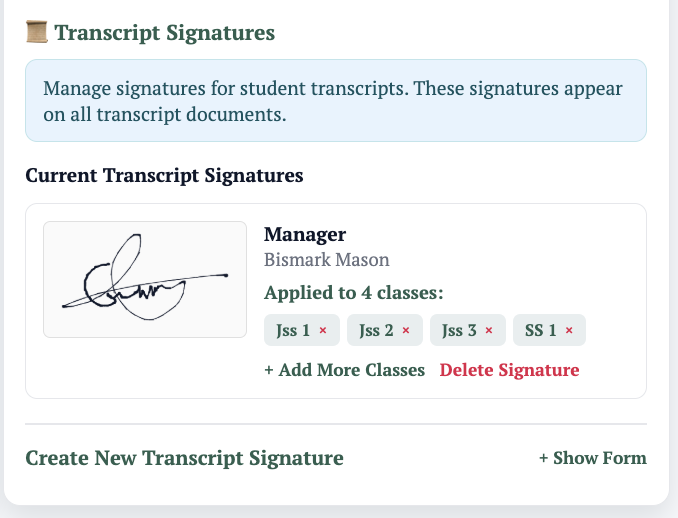
- Assign the signature to a class.
Once assigned, the signature applies to the class and every student in it.
Generate a transcript for a current student
- Navigate to the Classroom and select the student.
- At the bottom of the student details page, locate Transcript (visible only with the right permissions).
- If password protected, unlock to view.
- Download, print, or send by email.
Note: Printing without sending produces an unofficial transcript. Emailing produces an official transcript.
Generate a transcript for a graduated or archived student
NB: Archived students are those who left or moved to a different school. Managira retains their records.
- Navigate to Reports and select Closed Graduation Year Group.
- Open View Closed Graduation Year Group and search for the student.
- Click the student's name to open their details.
- Access the transcript from the student details page.
- Print as unofficial, or email as an official transcript to the desired address.